
US Marine Casualty Cards


Earlier this week I got my copy of Family Tree Magazine and I was reading an article that led me to World War II History Network and from there I found a link to an article about the United States Marine Corp making their casualty cards searchable.  You can find the database at Casualty Cards Database.

Fred Thomas, my husbands great uncle, was in WWII and in the Marines.  I searched the database and found :


On the first page it states : While the cards for World War II through Korea are not classified, however, they can often be very graphic.  Therefore, to maintain the dignity and honor of the Marines, the individual cards will only be released, upon request, on a case by case basis.  To request a card, please send an email to history.division@usmc.mil or a request in writting to:
United States Marine Corps History Division
Attn: Reference Branch
3078 Upshur Avenue
Quantico, Virginia 22134.   

I immediately sent an email {about 12:30 am because I don't sleep} requesting more information and did not really think much more about it.  The next morning I had an email with the images attached!!!  I almost deleted it because I did not recognize the email address...so glad I did not!!  There was a pdf file attached and it included 5 pages of card images for Fred Thomas.
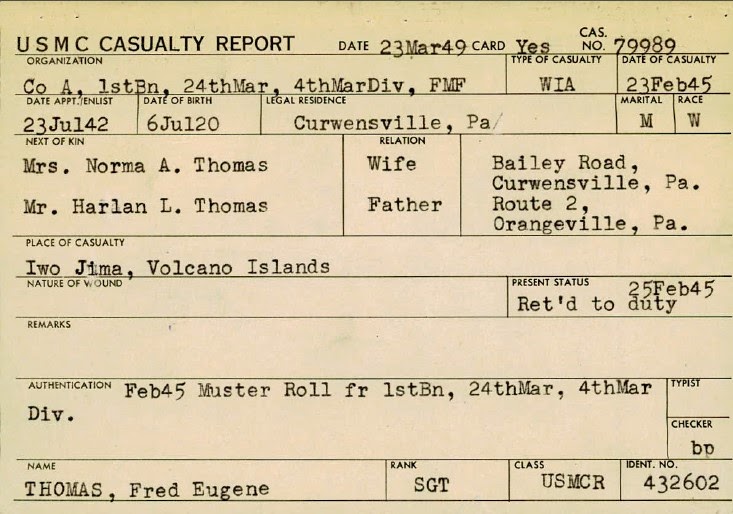


On the card that has his death information on it does not say what kind of wound he died from, instead there is the number 8-46-001.  Now I am on a mission to find out what this code means.

Clicking around the internet and reading all there is about genealogy is a wonderful thing!!

Comments

  1. Replies
    1. One of the best finds while researching this family.

      Delete
  2. Hi! I was trying to find a casualty report for a fellow marine who served on Okinawa and was wounded. I reached out using your link, yet its been a week and no response. Did they stop allowing to give out the casualty reports or are they not functional any more? Anything would be great about how I could get his report.

    Thank you,
    Jax

    ReplyDelete
    Replies
    1. Hello Jax
      Did you find the information you were looking for? You can search the Marine Corps Casualty cards at Ancestry at https://www.ancestry.com/search/collections/70837/ Also, here is a direct link to the Casualty Card database website https://www.usmcu.edu/Research/Marine-Corps-History-Division/Research-Tools-Facts-and-Figures/Casualty-Card-Database/

      Delete

Post a Comment

Popular posts from this blog

Simplify Your Life

While reading some stuff on a few websites I came up with a list...that I plan to add to and change...to simplify my life. Take a moment each day to be greatful Make sure to plan time for a vacation each year--give yourself a break and relax Make time for yourself Make goals --Keep a list and update as needed Get organized --will reduce stress Clean out/Throw out --if you're not using it get rid of it by donating, selling, etc. " Declutter "--set some guidelines--once a week, once a month, etc.--go room by room and remove the clutter To do list--helps keep things in "check"--If you don't get it done today dont't stress...just move it to the next day. **I just started this today--I made a list of the things that I need/want to do. I am checking them off as I go. I have a notebook by my computer and I am going to do it for each day...so far it is really helping--4 things checked off already. I am putting both household stuff and scrapping s...

Evernote Quick Tip -- Keyboard shortcuts

Evernote has some keyboard shortcuts to help you get information into Evernote quicker.  The following shortcuts are for Windows Desktop : Function Shortcut Create a new note Ctrl + N Create a new notebook Ctrl + Shift + N Paste the contents of the clipboard as a new note Ctrl + Alt + V Paste from the clipboard with unformatted text Ctrl + Shift + V Paste from the clipboard with original formatting Ctrl + V Create a new tag Ctrl + Shift + T Check spelling F7 Insert a check-box Ctrl + Shift + C Create a bulleted list Ctrl + Shift + B Create a numbered list Ctrl + Shift + O Insert a horizontal line Ctrl + Shift + - To center text Ctrl + E Add a hyperlink Ctrl + K Remove a hyperlink Ctrl + Shift + R Create a new saved search Ctrl + Shift + S Reset search Ctrl + Shift + A Rename a saved search F2 Find in Evernote Win + Shift + F Start screen capture mode. (You can use the Web Clipper to get a screen capture from a website or you can right ...

Marine Casualty Card Database

While I was writing Top 10 Blog Posts for 2019 I discovered that my top post was US Marine Casualty Cards from 2014.  Wow!  {There is also an update to the original post here  where I show some more information that was sent to me.}  I went back to read the post and discovered that the links no longer work.  I did a little digging and found a link to the Casualty Card Database at the Marine Corps University website.  At this site you click on the war you want to search and download a searchable spreadsheet.  Once you locate your Marine you send an email to request the card.  There are also links to download information about what the codes mean on the cards. I also found that you can search the U.S. Marine Corps Casualty Index, 1940-1958 , at Ancestry.com.  It gives the casualty date, type, unit, and service number.  There is a link to go to another website from the Ancestry database but that link does not work. {I believe...